This platform is built by its community
Every lesson, project, and tool on HelloC++ is funded by sponsors who believe C++ education should be accessible to everyone. Join them and help shape what we build next.
The Question Every Programmer Should Ask
You've written a function that works. It compiles, runs, and produces the correct output. But is it good?
Consider this scenario: You're building a search feature for an application. With 100 items, your search runs instantly. With 1,000 items, it takes a noticeable pause. With 10,000 items, users start complaining about slow response times. With 100,000 items, the feature becomes unusable.
What happened? The algorithm didn't change. The code still works correctly. But it doesn't scale.
This is where Big O notation becomes essential. It's a mathematical tool that helps you predict how your code will perform as the input size grows, before you deploy it to production and discover the hard way.
What Big O Notation Actually Measures
Big O notation describes the upper bound of an algorithm's growth rate. It answers the question: "In the worst case, how does the running time (or memory usage) grow as the input size increases?"
The "O" stands for "order of" and represents the relationship between input size and resource consumption.
Key insight: Big O doesn't measure actual time in seconds or memory in bytes. It measures growth rate. An O(n) algorithm might take 5 milliseconds or 5 seconds depending on the hardware, but its performance will always scale linearly with input size.
Why We Care About Growth Rate
Imagine two search algorithms:
- Algorithm A: Takes 100 operations for 10 items
- Algorithm B: Takes 10 operations for 10 items
Algorithm B seems 10x faster. But what if:
- Algorithm A: Takes 100 operations for 10 items, 200 for 100, 300 for 1000 (grows slowly)
- Algorithm B: Takes 10 operations for 10 items, 100 for 100, 10,000 for 1000 (grows explosively)
At 1,000 items, Algorithm A is now 33x faster. At 10,000 items, the difference becomes astronomical. Big O notation captures this growth behavior, helping you choose Algorithm A even though it looked slower initially.
Common Big O Complexities
Let's explore the most common complexity classes, from best to worst.
O(1) - Constant Time
The algorithm takes the same amount of time regardless of input size.
int getFirstElement(const std::vector<int>& data) {
    return data[0];
}

int getElementAtIndex(const std::vector<int>& data, int index) {
    return data[index];
}

bool isEmpty(const std::vector<int>& data) {
    return data.empty();
}
Accessing an array element by index is O(1) because the computer calculates the memory address directly: base_address + (index * element_size). Whether the array has 10 elements or 10 million, this calculation takes the same time.
Real-world examples:
- Hash table lookups (average case)
- Stack push/pop operations
- Checking if a number is even or odd
O(log n) - Logarithmic Time
The algorithm's time grows logarithmically. Each step eliminates a fraction of the remaining work.
int binarySearch(const std::vector<int>& sorted_data, int target) {
    int left = 0;
    int right = static_cast<int>(sorted_data.size()) - 1;

    while (left <= right) {
        int mid = left + (right - left) / 2;

        if (sorted_data[mid] == target) {
            return mid;
        }

        if (sorted_data[mid] < target) {
            left = mid + 1;
        } else {
            right = mid - 1;
        }
    }

    return -1;  // Not found
}
Binary search eliminates half the remaining elements with each comparison. For 1,000,000 elements, you need at most 20 comparisons (log2 of 1,000,000 is about 20).
Why logarithms? When you repeatedly divide a problem in half, the number of divisions needed to reach 1 is log2(n). This is why O(log n) algorithms scale beautifully.
| Input Size | Operations |
|---|---|
| 10 | ~3 |
| 100 | ~7 |
| 1,000 | ~10 |
| 1,000,000 | ~20 |
| 1,000,000,000 | ~30 |
O(n) - Linear Time
The algorithm's time grows proportionally with input size.
int findMaximum(const std::vector<int>& data) {
    if (data.empty()) {
        throw std::invalid_argument{"Cannot find maximum of empty vector"};
    }

    int maximum = data[0];
    for (int value : data) {
        if (value > maximum) {
            maximum = value;
        }
    }
    return maximum;
}

bool containsValue(const std::vector<int>& data, int target) {
    for (int value : data) {
        if (value == target) {
            return true;
        }
    }
    return false;
}
To find the maximum, you must examine every element at least once. There's no shortcut. If the input doubles, the time doubles.
Real-world examples:
- Finding an element in an unsorted array
- Counting occurrences
- Copying an array
- Simple validation of all elements
O(n log n) - Linearithmic Time
The algorithm performs a logarithmic operation for each element. This is the sweet spot for comparison-based sorting.
void mergeSort(std::vector<int>& data, int left, int right) {
    if (left >= right) {
        return;
    }

    int mid = left + (right - left) / 2;
    mergeSort(data, left, mid);
    mergeSort(data, mid + 1, right);
    merge(data, left, mid, right);
}

void merge(std::vector<int>& data, int left, int mid, int right) {
    std::vector<int> temp(right - left + 1);
    int i = left;
    int j = mid + 1;
    int k = 0;

    while (i <= mid && j <= right) {
        if (data[i] <= data[j]) {
            temp[k++] = data[i++];
        } else {
            temp[k++] = data[j++];
        }
    }

    while (i <= mid) {
        temp[k++] = data[i++];
    }
    while (j <= right) {
        temp[k++] = data[j++];
    }

    for (int idx = 0; idx < k; ++idx) {
        data[left + idx] = temp[idx];
    }
}
Merge sort divides the array in half (log n levels) and merges all elements at each level (n operations per level). The result: O(n log n).
Real-world examples:
- Efficient sorting (merge sort, heap sort, quick sort average case)
- Many divide-and-conquer algorithms
O(n^2) - Quadratic Time
The algorithm performs n operations for each of the n elements.
void bubbleSort(std::vector<int>& data) {
    int n = static_cast<int>(data.size());

    for (int i = 0; i < n - 1; ++i) {
        for (int j = 0; j < n - i - 1; ++j) {
            if (data[j] > data[j + 1]) {
                std::swap(data[j], data[j + 1]);
            }
        }
    }
}

bool hasDuplicate(const std::vector<int>& data) {
    int n = static_cast<int>(data.size());

    for (int i = 0; i < n; ++i) {
        for (int j = i + 1; j < n; ++j) {
            if (data[i] == data[j]) {
                return true;
            }
        }
    }
    return false;
}
Nested loops over the same data are the classic sign of O(n^2). When input doubles, time quadruples.
| Input Size | Operations |
|---|---|
| 10 | 100 |
| 100 | 10,000 |
| 1,000 | 1,000,000 |
| 10,000 | 100,000,000 |
At 10,000 elements, you're performing 100 million operations. This is where O(n^2) algorithms start to struggle.
When O(n^2) is acceptable:
- Small input sizes (< 1000 elements)
- Simple implementation outweighs performance needs
- The algorithm is rarely executed
O(2^n) - Exponential Time
The algorithm's time doubles with each additional input element.
int fibonacci(int n) {
    if (n <= 1) {
        return n;
    }
    return fibonacci(n - 1) + fibonacci(n - 2);
}
This naive Fibonacci implementation recalculates the same values repeatedly. For fibonacci(50), you're looking at over a trillion operations.
| Input | Operations (approximately) |
|---|---|
| 10 | 1,024 |
| 20 | 1,048,576 |
| 30 | 1,073,741,824 |
| 40 | 1,099,511,627,776 |
Real-world examples:
- Naive recursive solutions to problems
- Generating all subsets of a set
- Some brute-force cryptographic attacks
O(n!) - Factorial Time
The algorithm's time grows factorially. These algorithms are only practical for tiny inputs.
void generatePermutations(std::string& str, int left, int right) {
    if (left == right) {
        std::cout << str << '\n';
        return;
    }

    for (int i = left; i <= right; ++i) {
        std::swap(str[left], str[i]);
        generatePermutations(str, left + 1, right);
        std::swap(str[left], str[i]);
    }
}
| Input Size | Permutations |
|---|---|
| 5 | 120 |
| 10 | 3,628,800 |
| 15 | 1,307,674,368,000 |
| 20 | 2,432,902,008,176,640,000 |
Real-world examples:
- Traveling salesman problem (brute force)
- Generating all permutations
- Some scheduling problems
Visual Comparison
Understanding how these complexities compare at scale:
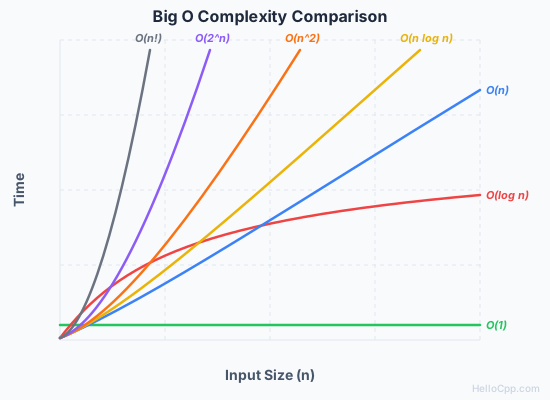
At small input sizes, the differences are negligible. At large input sizes, they determine whether your code runs in milliseconds or millennia.
Space Complexity
Big O also measures memory usage. Consider these two approaches to reversing an array:
O(n) Space:
std::vector<int> reverseWithCopy(const std::vector<int>& data) {
    std::vector<int> reversed;
    reversed.reserve(data.size());

    for (auto it = data.rbegin(); it != data.rend(); ++it) {
        reversed.push_back(*it);
    }

    return reversed;
}
O(1) Space:
void reverseInPlace(std::vector<int>& data) {
    int left = 0;
    int right = static_cast<int>(data.size()) - 1;

    while (left < right) {
        std::swap(data[left], data[right]);
        ++left;
        --right;
    }
}
The first creates a new array (O(n) extra space). The second modifies the original array using only two integer variables (O(1) extra space).
Space-time tradeoffs are common in algorithm design. Sometimes you can achieve faster time complexity by using more memory (caching, memoization). Other times, you sacrifice speed to reduce memory usage.
Analyzing Your Own Code
When analyzing algorithm complexity:
1. Identify the Input Size
What variable represents "n"? It depends on the function.
Collection size: For functions processing vectors, strings, or arrays, n is typically the number of elements.
int sumVector(const std::vector<int>& data) {
    int total = 0;
    for (int value : data) {  // Loops n times (where n = data.size())
        total += value;
    }
    return total;
}
Input value: Sometimes n is the numeric value itself, not a collection size.
void countDown(int n) {
    for (int i = n; i > 0; --i) {  // Loops n times
        std::cout << i << '\n';
    }
}
Multiple inputs: When a function has two independent inputs, keep them separate.
void printGrid(int rows, int cols) {
    for (int r = 0; r < rows; ++r) {      // Loops n times
        for (int c = 0; c < cols; ++c) {  // Loops m times
            std::cout << '*';
        }
        std::cout << '\n';
    }
}
// This is O(n * m), not O(n^2)
Why O(n * m) instead of O(n^2)? Because n and m can have vastly different sizes. A grid with 1000 rows and 5 columns is 5,000 operations, not 1,000,000. Only use O(n^2) when both loops iterate over the same input.
2. Count Operations That Scale
Focus on operations that happen more times as input grows:
void processData(const std::vector<int>& data) {
    int sum = 0;                          // O(1) - runs once

    for (int value : data) {              // O(n) - runs n times
        sum += value;                     // O(1) per iteration
    }

    std::cout << sum << '\n';             // O(1) - runs once
}
// Total: O(1) + O(n) * O(1) + O(1) = O(n)
3. Focus on the Dominant Term
When combining complexities, keep only the fastest-growing term:
- O(n^2 + n) = O(n^2)
- O(n + log n) = O(n)
- O(2^n + n^3) = O(2^n)
The dominant term overwhelms all others at large input sizes.
4. Drop Constants
Big O ignores constant factors:
- O(2n) = O(n)
- O(n^2 / 2) = O(n^2)
- O(100) = O(1)
While a 2x speedup matters in practice, it doesn't change the growth rate.
5. Consider Nested Structures
Nested loops multiply their complexities:
void nestedExample(const std::vector<int>& data) {
    int n = static_cast<int>(data.size());

    for (int i = 0; i < n; ++i) {           // O(n)
        for (int j = 0; j < n; ++j) {       // O(n)
            for (int k = 0; k < n; ++k) {   // O(n)
                // O(1) operation
            }
        }
    }
}
// Total: O(n) * O(n) * O(n) = O(n^3)
Common Patterns and Their Complexities
| Pattern | Time Complexity |
|---|---|
| Single loop through n elements | O(n) |
| Nested loops (2 levels) | O(n^2) |
| Loop that halves the problem each iteration | O(log n) |
| Divide and conquer with linear merge | O(n log n) |
| Recursive call on each element | Varies, often exponential |
| Hash table lookup | O(1) average |
| Binary search | O(log n) |
| Sorting | O(n log n) for efficient algorithms |
Best, Average, and Worst Case
Big O typically describes worst-case complexity, but algorithms can have different cases:
Linear Search:
int linearSearch(const std::vector<int>& data, int target) {
    for (int i = 0; i < static_cast<int>(data.size()); ++i) {
        if (data[i] == target) {
            return i;
        }
    }
    return -1;
}
- Best case: O(1) - target is the first element
- Average case: O(n/2) = O(n) - target is in the middle
- Worst case: O(n) - target is last or not present
Quick Sort:
- Best case: O(n log n) - balanced partitions
- Average case: O(n log n) - reasonably balanced partitions
- Worst case: O(n^2) - already sorted or reverse sorted with poor pivot selection
When choosing algorithms, consider which case you're likely to encounter and how catastrophic the worst case would be.
Practical Optimization Tips
1. Choose the Right Data Structure
The same operation can have different complexities depending on the data structure:
| Operation | Array | Linked List | Hash Set |
|---|---|---|---|
| Access by index | O(1) | O(n) | N/A |
| Search | O(n) | O(n) | O(1) avg |
| Insert at end | O(1)* | O(1) | O(1) avg |
| Insert at beginning | O(n) | O(1) | N/A |
*Amortized: Most insertions are O(1), but occasionally the array resizes (O(n)). Since resizing is rare, the average cost per insertion remains O(1).
2. Avoid Unnecessary Work
// Inefficient: O(n^2)
bool hasDuplicateSlow(const std::vector<int>& data) {
    for (size_t i = 0; i < data.size(); ++i) {
        for (size_t j = i + 1; j < data.size(); ++j) {
            if (data[i] == data[j]) {
                return true;
            }
        }
    }
    return false;
}

// Efficient: O(n)
bool hasDuplicateFast(const std::vector<int>& data) {
    std::unordered_set<int> seen;
    for (int value : data) {
        if (seen.count(value) > 0) {
            return true;
        }
        seen.insert(value);
    }
    return false;
}
Using a hash set trades O(n) space for O(n^2) to O(n) time improvement.
3. Sort When It Helps
If you need to perform many searches, sorting first might be worthwhile:
- 1,000 linear searches on 1,000 elements: O(n^2) = 1,000,000 operations
- Sort once, then 1,000 binary searches: O(n log n + k log n) = ~20,000 operations
4. Cache Repeated Computations
// Inefficient: O(2^n)
int fibSlow(int n) {
    if (n <= 1) return n;
    return fibSlow(n - 1) + fibSlow(n - 2);
}

// Efficient: O(n) with memoization
int fibFast(int n, std::unordered_map<int, int>& cache) {
    if (n <= 1) return n;

    if (cache.count(n) > 0) {
        return cache[n];
    }

    cache[n] = fibFast(n - 1, cache) + fibFast(n - 2, cache);
    return cache[n];
}
When Big O Isn't Everything
While Big O is essential for algorithm analysis, it's not the complete picture:
Constants matter for small inputs. Big O hides constant factors, but they affect real performance. Imagine two sorting algorithms:
- Algorithm A: O(n^2), but each operation takes 1 nanosecond
- Algorithm B: O(n log n), but each operation takes 50 nanoseconds (due to complex logic)
| n | Algorithm A (O(n^2)) | Algorithm B (O(n log n)) | Winner |
|---|---|---|---|
| 10 | 100 ops = 100 ns | 33 ops = 1,650 ns | A (16x faster) |
| 1,000 | 1,000,000 ops = 1 ms | 10,000 ops = 0.5 ms | B (2x faster) |
This is why simple algorithms like insertion sort are often used for small arrays, even inside "faster" algorithms like quicksort.
Memory access patterns matter. Cache-friendly algorithms can outperform theoretically faster algorithms that cause cache misses.
Amortized analysis matters. Dynamic arrays (like std::vector) have O(n) worst-case insertion but O(1) amortized insertion because resizing is rare.
Real-world performance requires profiling. Big O provides theoretical guidance, but always measure actual performance in your specific context.
Putting It Into Practice
Understanding Big O notation transforms how you approach problems:
- Before writing code: Consider what complexity your solution will have
- When reviewing code: Identify potential bottlenecks in nested loops or recursive calls
- When debugging performance: Analyze whether the algorithm or the implementation is the problem
- When choosing libraries: Understand the complexity guarantees they provide
The goal isn't to optimize everything to O(1). It's to make informed decisions about where performance matters and what tradeoffs are acceptable.
Continue Your Learning Journey
Big O notation is foundational to understanding data structures and algorithms. To put these concepts into practice:
- Data Structures & Algorithms Roadmap: Our structured learning path covering arrays, linked lists, trees, graphs, and essential algorithms with hands-on C++ exercises.
- Practice analyzing real code: When you encounter algorithms in our exercises, try to determine their complexity before running them.
- Compare implementations: When you see different solutions to the same problem, analyze why one might be preferred over another.
Understanding Big O notation is like learning to read a map before a journey. It won't walk the path for you, but it will help you choose the best route and avoid dead ends.
Questions or Feedback?
Struggling with complexity analysis or want to discuss a specific algorithm? Reach out - I'd love to hear about your learning journey.
This platform is built by its community
Every lesson, project, and tool on HelloC++ is funded by sponsors who believe C++ education should be accessible to everyone. Join them and help shape what we build next.
About the Author
Software engineer and C++ educator passionate about making programming accessible to beginners. With years of experience in software development and teaching, Imran creates practical, hands-on lessons that help students master C++ fundamentals.
Article Discussion
Share your thoughts and questions
No comments yet. Be the first to share your thoughts!